




Available from:
Makethingshappy.io
Manufacturer:
Makethingshappy.io
Install method:
Replace module
| GPIO # | Component |
|---|---|
| GPIO00 | User |
| GPIO01 | User |
| GPIO02 | User |
| GPIO03 | User |
| GPIO04 | User |
| GPIO05 | User |
| GPIO09 | User |
| GPIO10 | User |
| GPIO12 | User |
| GPIO13 | Relay_i 1 |
| GPIO14 | Relay_i 2 |
| GPIO15 | I2C SDA 1 |
| GPIO16 | I2C SCL 1 |
| GPIO17 | User |
| GPIO18 | User |
| GPIO19 | User |
| GPIO20 | User |
| GPIO21 | Relay_i 3 |
| GPIO22 | Relay_i 4 |
| GPIO23 | User |
| GPIO24 | User |
| GPIO25 | User |
| GPIO26 | None |
| GPIO27 | None |
| GPIO28 | None |
| GPIO29 | None |
| GPIO30 | None |
| GPIO31 | User |
| GPIO32 | User |
| GPIO33 | User |
| GPIO34 | User |
| GPIO35 | User |
| GPIO36 | User |
| GPIO37 | User |
| GPIO38 | User |
| GPIO39 | User |
| GPIO40 | User |
| GPIO41 | User |
{"NAME":"IoTextra Relay2","GPIO":[1,1,1,1,1,1,1,1,1,256,257,640,608,1,1,1,1,258,259,1,1,1,0,0,0,0,0,1,1,1,1,1,1,1,1,1,1,1],"FLAG":0,"BASE":1}
Overview
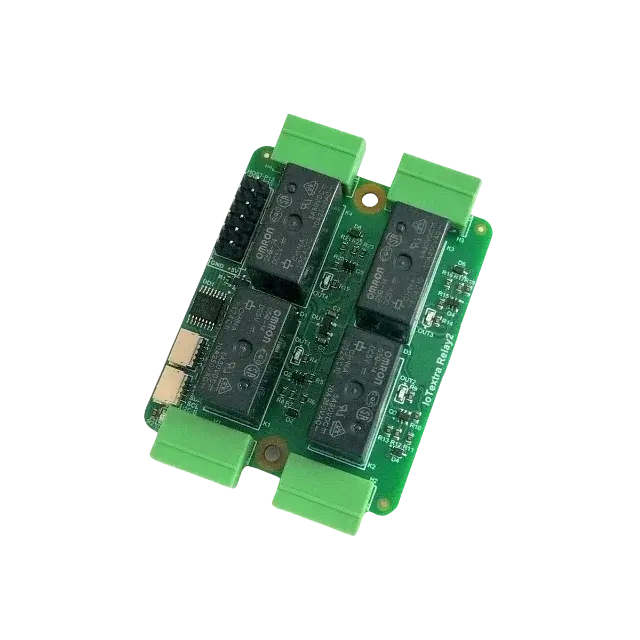
The IoTextra Relay2 module is designed for industrial-grade reliability in both hobbyist and professional automation applications.
Key features include:
- 4 relays per module, each SPDT (1 Form C)
- Switching capability: 250 VAC / 30 VDC
- Contact current rating: 10A
- High-quality relay options: Panasonic ALQ105, Omron G5Q-14, HF33F/005-ZS3, TE PE014005
The module can be integrated into IoTextra systems or other embedded platforms to control motors, lights, solenoids, or other electrical loads safely and reliably.
Documentation and Resources
Setup instructions, configuration commands, and additional guides can be found here:
-
Project repository:
https://github.com/makethingshappy/IoThome -
Vendor website:
https://makethingshappy.io