




Waveshare Industrial 8-Channel Relay Board (ESP32-S3-POE-ETH-8DI-8RO)
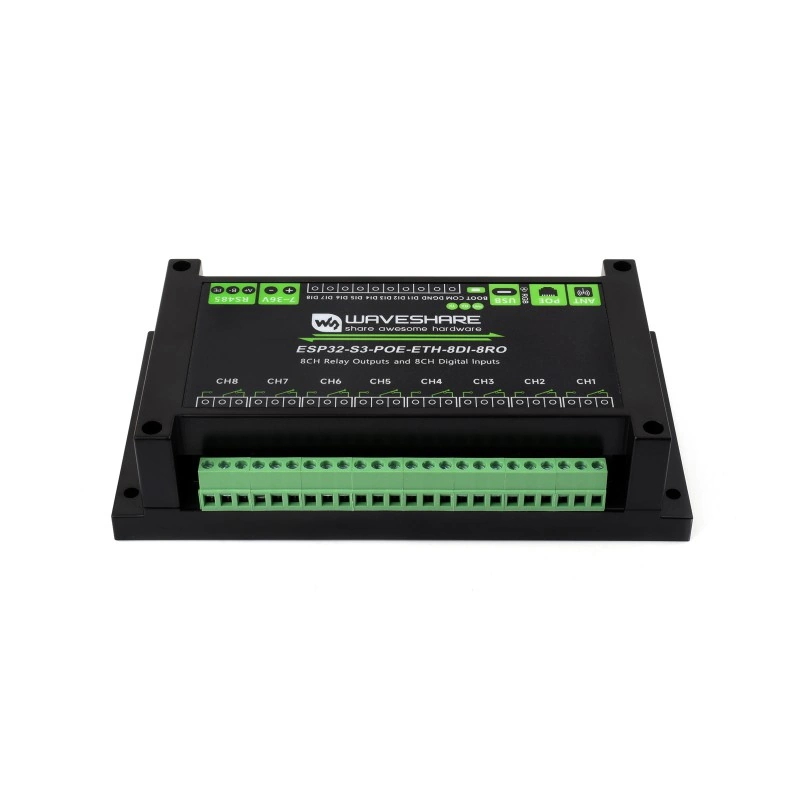
Available from:
Amazon.com
Amazon.de
Aliexpress.com
Manufacturer:
Waveshare.com
Install method:
USB to Serial
| GPIO # | Component |
|---|---|
| GPIO00 | ??? |
| GPIO01 | User |
| GPIO02 | User |
| GPIO03 | User |
| GPIO04 | Button 1 |
| GPIO05 | Button 2 |
| GPIO06 | Button 3 |
| GPIO07 | Button 4 |
| GPIO08 | ??? |
| GPIO09 | ??? |
| GPIO10 | ??? |
| GPIO11 | ??? |
| GPIO12 | ETH MDIO |
| GPIO13 | SPI MOSI |
| GPIO14 | SPI MISO |
| GPIO15 | SPI CLK |
| GPIO16 | ETH MDC |
| GPIO17 | User |
| GPIO18 | User |
| GPIO19 | User |
| GPIO20 | User |
| GPIO21 | User |
| GPIO33 | None |
| GPIO34 | None |
| GPIO35 | None |
| GPIO36 | None |
| GPIO37 | None |
| GPIO38 | WS2812 1 |
| GPIO39 | User |
| GPIO40 | User |
| GPIO41 | I2C SCL 1 |
| GPIO42 | I2C SDA 1 |
| GPIO43 | User |
| GPIO44 | User |
| GPIO45 | User |
| GPIO46 | Buzzer |
| GPIO47 | User |
| GPIO48 | User |
Configuration for ESP32-S3
{"NAME":"ESP32S3-POE-ETH-8DI-8RO","GPIO":[40,1,1,1,32,33,34,35,36,37,38,39,5600,704,672,736,5568,1,1,1,1,1,0,0,0,0,0,1376,1,1,608,640,1,1,1,480,1,1],"FLAG":0,"BASE":1}You’ll need to compile your own version of tasmota32-s3.bin as it uses drivers not present in the default binaries.
It needs the following defines:
#define USE_TCA9554
#define USE_RTC_CHIPS
#define USE_PCF85363
Once installed add a rule to configure TCA9554 for relay control:
rule3 on file#tca9554.dat do {""NAME"":""TCA9554"",""GPIO"":[224,225,226,227,228,229,230,231]} endon
and execute command SetOption37 24 to rearrange WS2812 color mapping.